

I run several Claude Code agents across two Macs. Every so often one of them stops because it needs something only I can give: a 2FA code, a login, a yes or no. If I am away from the Mac, it just sits there until I come back.
The Claude mobile app’s Remote Control can reach those sessions, but that means switching between five of them on my phone and reading a lot to find out what each one wants. What I wanted was simpler: one short line on my phone or watch, I reply, and the agent carries on straight away. My Mac could be at home while I am out for a walk.
So I built what I call the agent desk. This post covers the options I weighed, how it works, what to watch out for, and the bare minimum code to build your own.
The Options I Weighed
- Remote Control. It works by hand, but there is no API to build on.
- A Stop hook that waits for my reply. No extra parts needed, but the hook holds the session until it times out, and a reply that arrives late has nowhere to go.
- The official Telegram channel plugin. No custom code, but it means one bot per agent. I wanted one inbox, not a chat per agent.
- Routing replies through my AI assistant. It could batch and prioritise, but every reply would cost a model call, and login codes would pass through a model provider.
claude -p --resumeinto the running session. Two processes would be writing to the same transcript.
I went with a custom Claude Code channel per session, one small relay, and one Telegram bot. The relay is hosted, on Cloudflare’s free plan, because agents on both Macs need to reach it.
How It Works
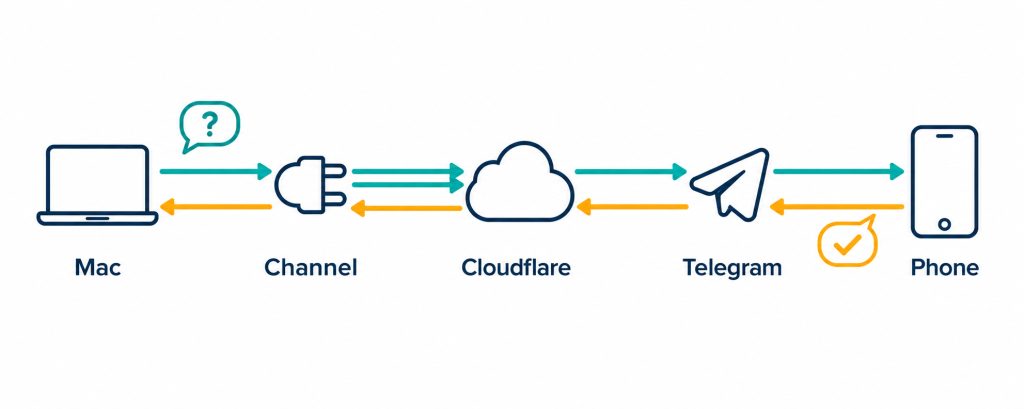
- The channel. A small MCP server that each session loads as a Claude Code channel. It gives the agent one tool,
ask_mwale, and opens an outbound WebSocket to the relay, so no Mac opens a port. - The relay. A Cloudflare Worker with one SQLite-backed Durable Object, on the Workers Free plan. It holds a WebSocket per session and sends each question to the bot, labelled with the agent and machine, like
[agent@air-1]. - Routing by reply. I answer by replying to the message in Telegram. The relay looks up which session sent that message and pushes my answer into it as a channel event, which starts a new turn.
- The idle hook. Some agents stop without asking. A Notification hook catches that and sends me what the agent last said, and my reply to that goes back to the same session.
The relay is plain code. No model sits between my reply and the agent.
A few safety rules come with it. Telegram’s webhook must carry a secret set at setup. The relay only listens to my own Telegram user, fixed once by pairing. Channels sign in to the relay with a token. And passwords never go through chat: the agent asks me to put the password in my password manager and tell it which vault.
What Went Wrong on the Way
Three things caught me out that you are likely to hit too.
- A channel must be a registered MCP server. A server passed with
--mcp-configis refused as a channel. Register it withclaude mcp addinstead. Every session then loads it, so make it do nothing unless the session was started for the desk. Otherwise a session could ask a question whose answer never comes back. - The channel outlived its session. The open WebSocket kept the process alive after the session closed, reconnecting for nobody. The fix is to exit when the session’s input closes, which the code below does.
- Pairing failed silently. I sent the pair code and got nothing back. The Telegram webhook had never been set, so Telegram had nowhere to deliver my message. If your bot does not answer
/pair, check the webhook withhttps://api.telegram.org/bot<TELEGRAM_TOKEN>/getWebhookInfo. An emptyurlmeans it is not set, so run the setup step again.
Results
- Live round trips work: a session asked, I replied from my phone, and the session used my answer.
- A question of about 560 characters arrived in full on my Amazfit watch.
- With one session asking on each Mac, I replied AIR1 to one and AIR2 to the other, and each session got only its own reply.
On cost: the Workers Free plan allows 100,000 Durable Object requests a day. I have not measured my real use yet, but the desk carries a handful of short messages, not a stream.
The Bare Minimum Code
My own desk has a few extras. The code below is the core of it: one question, one reply, routed to the right session. It leaves out the idle hook, the offline queue (a reply sent while a session is disconnected is lost), the /waiting command and the launcher. It is three files.
1. The relay config: worker/wrangler.jsonc
{
  "name": "agent-desk",
  "main": "src/index.js",
  "compatibility_date": "2026-09-01",
  "durable_objects": {
    "bindings": [{ "name": "DESK", "class_name": "Desk" }]
  },
  "migrations": [{ "tag": "v1", "new_sqlite_classes": ["Desk"] }]
}
2. The relay: worker/src/index.js
// Relay: one Telegram bot, many Claude Code sessions. Plain code, no model.
import { DurableObject } from 'cloudflare:workers'

const enc = new TextEncoder()
function same(a, b) {
  if (typeof a !== 'string' || typeof b !== 'string') return false
  const x = enc.encode(a), y = enc.encode(b)
  return x.byteLength === y.byteLength && crypto.subtle.timingSafeEqual(x, y)
}

export default {
  async fetch(req, env) {
    const path = new URL(req.url).pathname
    const desk = env.DESK.get(env.DESK.idFromName('desk'))
    if (path === '/telegram') {
      const secret = req.headers.get('X-Telegram-Bot-Api-Secret-Token')
      return same(secret, env.WEBHOOK_SECRET) ? desk.fetch(req) : new Response('forbidden', { status: 403 })
    }
    if (path === '/connect' || path === '/setup') {
      const auth = req.headers.get('Authorization')
      return same(auth, `Bearer ${env.DESK_TOKEN}`) ? desk.fetch(req) : new Response('unauthorized', { status: 401 })
    }
    return new Response('not found', { status: 404 })
  },
}

export class Desk extends DurableObject {
  constructor(ctx, env) {
    super(ctx, env)
    this.sql = ctx.storage.sql
    this.sql.exec('CREATE TABLE IF NOT EXISTS kv (k TEXT PRIMARY KEY, v TEXT)')
    this.sql.exec('CREATE TABLE IF NOT EXISTS asks (message_id INTEGER PRIMARY KEY, session TEXT)')
    // Keep-alive pings are answered without waking the object.
    ctx.setWebSocketAutoResponse(new WebSocketRequestResponsePair('ping', 'pong'))
  }

  async tg(method, body) {
    const api = this.env.TELEGRAM_API || 'https://api.telegram.org'
    const res = await fetch(`${api}/bot${this.env.TELEGRAM_TOKEN}/${method}`, {
      method: 'POST',
      headers: { 'content-type': 'application/json' },
      body: JSON.stringify(body),
    })
    return res.json()
  }

  owner() {
    return this.sql.exec(`SELECT v FROM kv WHERE k = 'owner'`).toArray()[0]?.v
  }

  async fetch(req) {
    const url = new URL(req.url)

    if (url.pathname === '/connect') {
      const session = url.searchParams.get('session')
      const label = url.searchParams.get('label') || 'agent'
      const [client, server] = Object.values(new WebSocketPair())
      this.ctx.acceptWebSocket(server, [session])
      server.serializeAttachment({ session, label })
      return new Response(null, { status: 101, webSocket: client })
    }

    if (url.pathname === '/setup') {
      return Response.json(await this.tg('setWebhook', {
        url: `${url.origin}/telegram`,
        secret_token: this.env.WEBHOOK_SECRET,
        allowed_updates: ['message'],
      }))
    }

    if (url.pathname === '/telegram') {
      const update = await req.json().catch(() => ({}))
      await this.onMessage(update.message)
      return new Response('ok')
    }

    return new Response('not found', { status: 404 })
  }

  // A session asks a question.
  async webSocketMessage(ws, raw) {
    if (raw === 'ping') return
    const { session, label } = ws.deserializeAttachment()
    const { id, text } = JSON.parse(raw)
    const answer = (o) => ws.send(JSON.stringify({ id, ...o }))
    const owner = this.owner()
    if (!owner) return answer({ type: 'error', error: 'The desk is not paired yet.' })
    const res = await this.tg('sendMessage', {
      chat_id: owner,
      text: `[${label}] ${text}`,
      reply_markup: { force_reply: true },
    })
    if (!res.ok) return answer({ type: 'error', error: res.description })
    this.sql.exec('INSERT INTO asks (message_id, session) VALUES (?, ?)', res.result.message_id, session)
    answer({ type: 'asked' })
  }

  // A message from Telegram: pairing, or a reply to a question.
  async onMessage(m) {
    if (!m || typeof m.text !== 'string' || !m.from) return
    const owner = this.owner()
    const code = this.env.PAIR_CODE

    if (!owner) {
      if (code && m.chat.type === 'private' && same(m.text.trim(), `/pair ${code}`)) {
        this.sql.exec(`INSERT INTO kv (k, v) VALUES ('owner', ?)`, String(m.from.id))
        await this.tg('sendMessage', { chat_id: m.chat.id, text: 'Paired. Reply to a question to answer it.' })
      }
      return
    }
    if (String(m.from.id) !== owner) return

    const asked = m.reply_to_message
      && this.sql.exec('SELECT session FROM asks WHERE message_id = ?', m.reply_to_message.message_id).toArray()[0]
    if (!asked) {
      await this.tg('sendMessage', { chat_id: m.chat.id, text: 'Reply to the question you are answering.' })
      return
    }
    for (const ws of this.ctx.getWebSockets(asked.session)) {
      ws.send(JSON.stringify({ type: 'reply', text: m.text }))
    }
  }
}
3. The channel: channel/desk.mjs
#!/usr/bin/env node
// Claude Code channel: gives the session an ask_mwale tool and pushes the
// answer back in as a <channel source="desk"> event. stdout is the MCP
// transport, so never print to it.
import { Server } from '@modelcontextprotocol/sdk/server/index.js'
import { StdioServerTransport } from '@modelcontextprotocol/sdk/server/stdio.js'
import { ListToolsRequestSchema, CallToolRequestSchema } from '@modelcontextprotocol/sdk/types.js'
import WebSocket from 'ws'
import { randomUUID } from 'node:crypto'

const { DESK_URL, DESK_TOKEN, DESK_LABEL = 'agent' } = process.env
const on = !!(DESK_URL && DESK_TOKEN) // without these, the desk stays out of the way
const session = randomUUID()
const waiting = new Map()
let ws

const mcp = new Server({ name: 'desk', version: '0.1.0' }, {
  capabilities: { experimental: { 'claude/channel': {} }, tools: {} },
  instructions: on ? [
    'When you are blocked on something only Mwale can give (a 2FA code, a yes or no),',
    'call ask_mwale with one short line naming the task and what you need.',
    'Never ask for a password by chat. After asking, end your turn.',
    'His answer arrives as a <channel source="desk"> event.',
  ].join(' ') : 'The desk is off in this session. Do not use it.',
})

function connect() {
  const url = new URL('/connect', DESK_URL.replace(/^http/, 'ws'))
  url.searchParams.set('session', session)
  url.searchParams.set('label', DESK_LABEL)
  ws = new WebSocket(url, { headers: { Authorization: `Bearer ${DESK_TOKEN}` } })
  const ping = setInterval(() => ws.readyState === WebSocket.OPEN && ws.send('ping'), 30000)
  ws.on('message', (buf) => {
    if (buf.toString() === 'pong') return
    const msg = JSON.parse(buf)
    if (msg.type === 'reply') {
      mcp.notification({ method: 'notifications/claude/channel', params: { content: msg.text, meta: { from: 'mwale' } } })
    } else if (waiting.has(msg.id)) {
      waiting.get(msg.id)(msg)
      waiting.delete(msg.id)
    }
  })
  ws.on('close', () => { clearInterval(ping); setTimeout(connect, 5000) })
  ws.on('error', (e) => console.error('[desk]', e.message))
}

function ask(text) {
  return new Promise((resolve) => {
    if (ws?.readyState !== WebSocket.OPEN) return resolve({ type: 'error', error: 'The desk is not connected.' })
    const id = randomUUID()
    waiting.set(id, resolve)
    ws.send(JSON.stringify({ id, text }))
    setTimeout(() => waiting.delete(id) && resolve({ type: 'error', error: 'The desk did not confirm.' }), 15000)
  })
}

mcp.setRequestHandler(ListToolsRequestSchema, async () => ({
  tools: on ? [{
    name: 'ask_mwale',
    description: 'Ask Mwale one short question on Telegram. His answer arrives later as a <channel source="desk"> event.',
    inputSchema: {
      type: 'object',
      properties: { question: { type: 'string', description: 'One line: the task, and exactly what you need.' } },
      required: ['question'],
    },
  }] : [],
}))

mcp.setRequestHandler(CallToolRequestSchema, async (req) => {
  const res = await ask(String(req.params.arguments?.question || ''))
  return res.type === 'asked'
    ? { content: [{ type: 'text', text: 'Sent. End your turn; the answer will arrive as a channel event.' }] }
    : { content: [{ type: 'text', text: res.error }], isError: true }
})

await mcp.connect(new StdioServerTransport())
// Exit with the session, or the open socket keeps this process alive.
process.stdin.on('close', () => process.exit(0))
if (on) connect()
Rename ask_mwale and the wording to suit yourself.
Set It Up
You need Node.js 22 or later, a free Cloudflare account and a Telegram account.
- Create a bot with @BotFather and keep its token.
- Deploy the relay from the
workerfolder and set its four secrets. The last three are values you make up: two long random strings and a short one-time code.
cd worker
npx wrangler login
npx wrangler deploy
npx wrangler secret put TELEGRAM_TOKEN   # from @BotFather
npx wrangler secret put WEBHOOK_SECRET
npx wrangler secret put DESK_TOKEN
npx wrangler secret put PAIR_CODE- Point Telegram at the relay, using the URL
wrangler deployprinted:
curl -X POST -H "Authorization: Bearer <DESK_TOKEN>" https://<your-worker>.workers.dev/setup- Send your bot
/pair <PAIR_CODE>. From then on it only listens to you. - On each Mac, install the channel and register it with Claude Code:
cd channel
npm init -y
npm install @modelcontextprotocol/sdk ws
claude mcp add -s user desk -- node "$PWD/desk.mjs"- Start a session with the desk switched on:
DESK_URL=https://<your-worker>.workers.dev DESK_TOKEN=<DESK_TOKEN> DESK_LABEL=agent@air-1 \
  claude --dangerously-load-development-channels server:desk
Custom channels are still a research preview, which is why they need that flag. Accept the warning at launch. A session started without DESK_URL and DESK_TOKEN gets no tool and opens no connection, so plain claude is unaffected. I wrap the command above in a small desk script so I only type desk.
To check it, ask the session to use ask_mwale, then reply to the message on your phone. The answer should show up in the session and it carries on.